By Tamsi Besson ·
Unsloth Studio — run and train LLMs locally
Studio, Desktop, and Unsloth kernels: GGUF / MLX, low-VRAM fine-tunes, Data Recipes — and why the Qwen3.8-27B GGUF fits in 17 GB.
- Unsloth
- Local LLM
- GGUF
- Qwen
- Fine-tuning
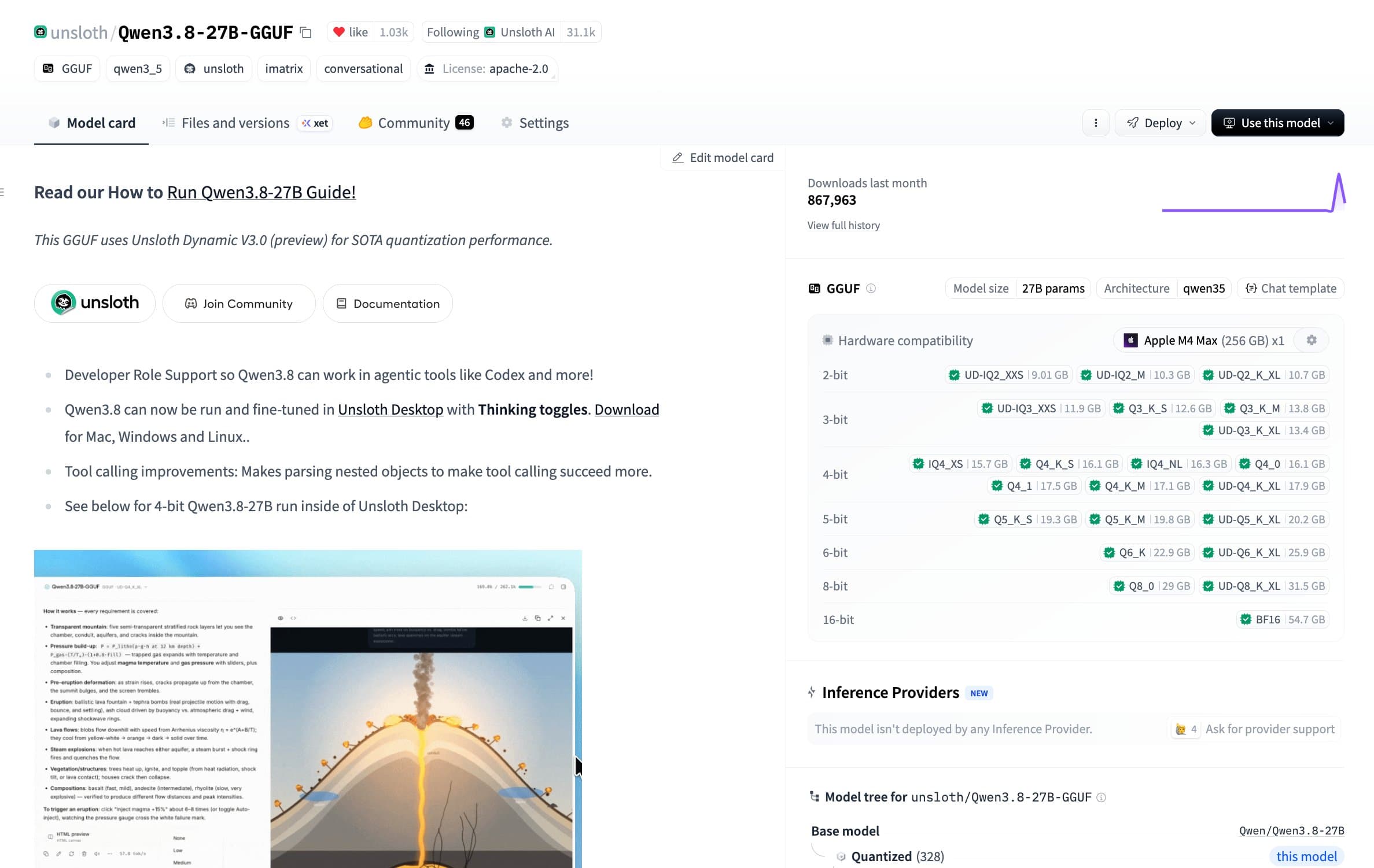
In mid-August Unsloth shipped a Qwen3.8-27B GGUF. In under 24 hours: 1,000 likes, #3 trending model on Hugging Face, 1M downloads. The useful line isn’t the counter — it’s “Run on 17GB RAM/VRAM setups via Unsloth.” A frontier-adjacent 27B that fits on hardware you own is exactly what Studio is for.
What Unsloth is
Unsloth (github.com/unslothai/unsloth) started as a training library: custom kernels, ~2× faster, ~70% less VRAM than Transformers + PEFT, with no claimed quality loss. Studio is the local UI on top: a Desktop app (Mac, Windows, Linux) or unsloth studio in the browser. Same engine, no notebook.
- Local inference: GGUF, safetensors, MLX on Mac, image/video diffusion.
- No-code training: 500+ text, vision, TTS, embedding models — QLoRA, LoRA, FP8, full.
- Data Recipes: PDF, CSV, JSON, DOCX, TXT → dataset (NVIDIA NeMo Data Designer).
- Export: GGUF, 16-bit safetensors, LoRA adapter — to llama.cpp, Ollama, vLLM, LM Studio.
- Agents: OpenAI-compatible endpoint +
unsloth start(Claude Code, Codex, Hermes, OpenCode).
Why 17 GB changes the math
Unsloth’s Qwen3.8-27B GGUF (huggingface.co/unsloth/Qwen3.8-27B-GGUF) is the textbook case. The same model in BF16 is ~55 GB. Unsloth’s quant fits in 17 GB — RTX 4070, 32 GB Mac on MLX, a small cloud box. You don’t rent an H100 to “just try it.” You load, chat, compare, export.
- No need to fine-tune to use it: Studio loads a GGUF and you’re in.
- Self-healing tool calling, private web search, sandboxed Bash/Python.
- Arena: two models / quants side by side in the same UI.
- Offline: no usage telemetry; minimal hardware info for compatibility.
The Studio loop
The docs (unsloth.ai/docs/new/studio) describe one loop. You no longer chain Transformers, a quantizer, Ollama, and a YAML file.
- Launch Desktop or
unsloth studio— search a Hub model or a local GGUF. - Optional: Data Recipes to build the set from your files.
- Fine-tune QLoRA (low-VRAM default) / LoRA / full, metrics and VRAM in real time.
- Compare the checkpoint to the baseline in chat.
- Export to the runtime you already run.
Install
Desktop: unsloth.ai/download/mac (Windows and Linux too). CLI:
# macOS / Linux / WSL
curl -fsSL https://unsloth.ai/install.sh | sh

unsloth studio -H 0.0.0.0 -p 8888
# → http://127.0.0.1:8888

# Cloudflare HTTPS tunnel (optional)
unsloth studio --secure
NVIDIA: GPU training + inference. Mac: training, MLX, and GGUF. CPU: chat and Data Recipes. Heavy training stays on NVIDIA GPUs. Once a model is loaded:
unsloth start hermes
# also: claude, codex, opencode, openclaw
In my stack
vLLM on AWS still owns the daily agent. Studio is where I try the GGUF of the day — Qwen3.8-27B in 4-bit on the M1, for instance — and where I’d fine-tune a corpus that shouldn’t leave the machine. More on the 27B: /blog/qwen-3-8-27b
Takeaway
Unsloth is no longer just a fast LoRA library. Studio is where you run, compare, and export the open models of the week — including a 27B that fits in 17 GB. The Qwen3.8 tweet isn’t empty marketing: it’s proof local caught up to the release cadence.
- Studio docs: unsloth.ai/docs/new/studio
- Repo: github.com/unslothai/unsloth
- Qwen3.8-27B GGUF: huggingface.co/unsloth/Qwen3.8-27B-GGUF
- Announcement: x.com/UnslothAI/status/2088627177655050362
- Qwen 3.8 27B: /blog/qwen-3-8-27b