By Tamsi Besson ·
Hermes HUD — play WoW and prompt at the same time
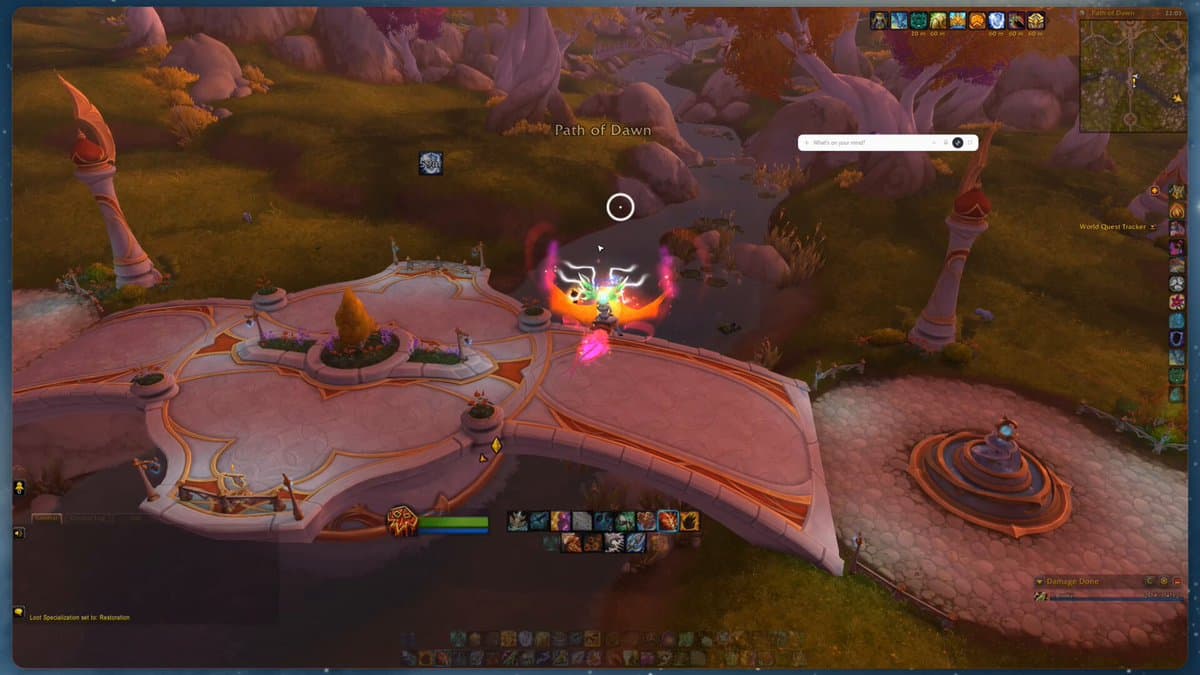
Brooklyn (Nous Research) drops the agent as an overlay on a WoW session. The HUD is no longer a window you alt-tab to: it’s a layer, and its position is the context.
- Hermes
- Nous
- Desktop
- HUD
- Agents
I wrote why I’m moving to Hermes for workflows that should outlive a Cursor chat. On 24 Aug, Brooklyn (@NousResearch) ships the next notch: play WoW and prompt in the same session. Not a second monitor. An overlay.
Why I care
A desktop agent’s bottleneck isn’t only the model. It’s attention. Hermes in its own window is still an alt-tab: you leave the game, the terminal, Figma, the ticket. The HUD flips that — the agent comes onto the work, not beside it. Brooklyn’s line: *a seamless overlay where you can keep an eye on things or ask questions about a game during your session.*
- The WoW clip is the meme. The product is a buddy agent you drop anywhere.
- The bar isn’t decoration: where you park it is context. “this”, “here”, “that page” resolve to what’s underneath.
- Same agent as the CLI / gateway — same skills, memory, sessions. Just another surface.
What the HUD actually is
In Hermes Desktop, ⌘/Ctrl+Shift+H (or the titlebar button) detaches chat: chrome-free, always-on-top, live transcript + composer. The main window steps aside. You move the bar (press-and-hold the composer), resize it, and ⌘/Ctrl+Shift+G snaps it to the cursor from any app.
That part isn’t new in August. The “buddy” HUD already reads an X post, a TradingView chart, a Figma page without leaving the app. The WoW tweet is the game mode on top: when a fullscreen app owns the screen, the HUD becomes an in-game chat frame.
Game overlay mode
Brooklyn merged HUD game-overlay the day of the tweet — verified live on Windows 11, fullscreen WoW. The detector ignores a maximized window: it wants another process edge-to-edge. Explorer / Finder / Dock never count. Deliberate hysteresis: entering, the game must be what you’re looking at; staying, the game just has to still exist — otherwise clicking the HUD to type would drop overlay mode the moment you used it.
- Idle bar at a glanceable opacity — you watch, you don’t chase a log that fades at the wrong time.
- The transcript stays open while the game is there, instead of dying on a timer.
- Light-on-dark ink is forced: a light theme over a WoW cave is unreadable. Your own lines are gold — game-UI blue/purple would vanish.
- Borderless fullscreen (the modern default) + macOS Spaces: the overlay holds. Exclusive fullscreen bypasses the compositor — the HUD comes back on alt-tab. No magic.
In practice
If you already run hermes in a CLI, hermes desktop opens the same config. HUD:
⌘/Ctrl+Shift+H— enter / exit. Session intact when you come back.⌘/Ctrl+Shift+G— snap to pointer (global). No-op on native Wayland: the compositor owns placement.- Linux: Hyprland pins the HUD via IPC. COSMIC often ignores
always-on-top— XWayland if you need it, at the cost of click-through.
Where it lands in my stack
I don’t need WoW for this to matter. A LivingColor / MCP agent running while I’m in Jira, a GitLab MR, or a VisualQ replay — without leaving the surface — is the HUD contract. Cursor stays the editor. Hermes stays the long automation. The HUD is the layer that stops stealing focus.
Takeaway
The tweet is a WoW clip. The change is that Hermes Desktop stops being an app you open and becomes a layer you park. Position = context. Fullscreen = in-game chat, not a ghost window. Exclusive fullscreen is still a wall (fair). For me the test is Shift+H on a real workflow — not a loading screen.
- Demo: Brooklyn’s tweet
- Docs: Hermes Desktop
- Game overlay PR: hermes-agent#93484
- Why Hermes: the earlier post